PitchTracker
See What Happens After You Send the Pitch.
Engagement signals from the shared presentation. Not a guess about whether they will buy.
After you share a tracked link, PitchTracker shows what happened to that pitch: whether it was opened, how far it was watched, whether the viewer came back, and whether they clicked an available next step.
Those are engagement signals. They can help you decide who to follow up with. They are not buyer intent, budget, purchase probability, or a prediction that the deal will close.
What PitchTracker can show
Opened
The recipient opened the tracked share link.
Viewing progress
How far the viewer got through the pitch.
Watched fully
The viewer reached the end. This is a completion signal in the product, not a promise they absorbed every point.
Returned
The same recipient came back to the pitch.
Next step clicked
They clicked a calendar or external call to action on the share page. The button is on the page around the video. It is not burned into the MP4.
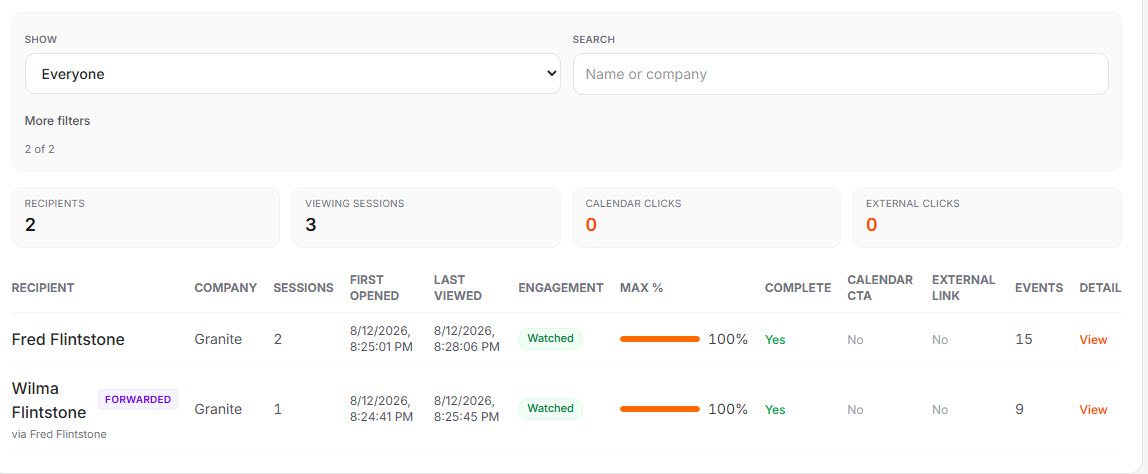
A tracked link is for a named recipient.
You create a share link for a person: name, company, and email. Persuasive Pitch does not send that email. You send the link yourself, in the message you already use.
The signals are tied to that link. If someone forwards it, a later viewer can be asked to identify themselves. That gate is not guaranteed for every forward, and it is not the same as knowing who watched.
Filters for the follow-up list
PitchTracker includes workflow filters so a seller can sort the list. The labels describe what happened on the link. They are not a score.
Hot leads
Watched fully and clicked a call to action. A workflow filter for follow-up, not a lead score and not a prediction they will buy.
Needs follow-up
Opened the pitch or watched part of it, and did not click a call to action.
Not opened
The share link has not been opened.
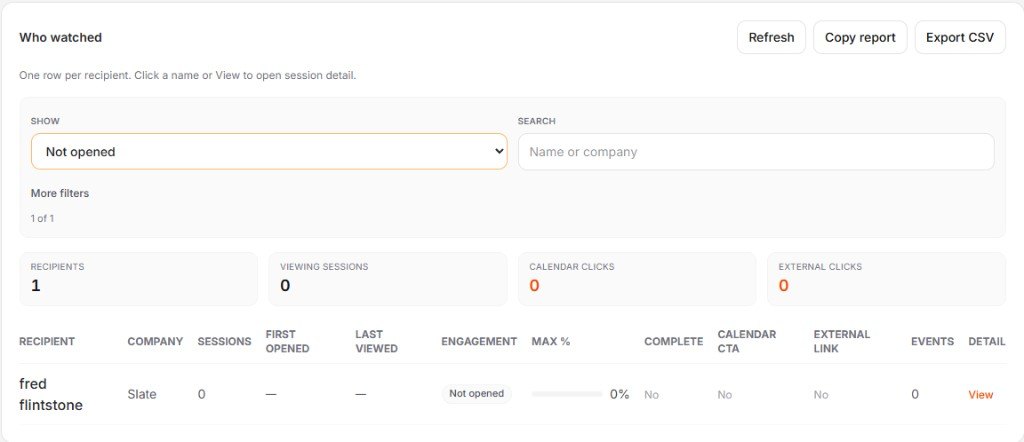
Review it in the product. Export it when you need a file.
Sellers review engagement in PitchTracker. The same view can be exported as a CSV. If your team wants that activity in another system, talk with us about integration options for a sales team.
Where it sits in the work
1
Create
2
Polish
3
Finish
4
Share
5
Observe
6
Follow up
PitchStudio creates and polishes the narrated presentation. PitchFinisher is the review before it is shared. PitchTracker is what you look at after the link goes out, so the next conversation can start from what actually happened.
Explore PitchStudio →Useful after the meeting, when someone else is carrying the story.
A champion can forward the pitch inside the account. PitchTracker does not tell you what they said in that room. It tells you whether the shared pitch was opened and how it was used.
That is one input for follow-up. The business case still has to stay understandable as it moves. That larger practice is Champion Enablement and Buyer Value Reinforcement.
Related
See the pitch after it leaves your hands.
Bring a presentation you already share. We'll show PitchStudio creating the narrated video and PitchTracker showing what happens on the link.
Schedule a Demo